Difference between revisions of "Scenario - Bidder won the Auction"
From BuddyBid wiki
| (9 intermediate revisions by the same user not shown) | |||
| Line 1: | Line 1: | ||
| − | |||
| − | |||
| − | |||
{| class="wikitable" style="text-align: center;" | {| class="wikitable" style="text-align: center;" | ||
| '''Case#''' | | '''Case#''' | ||
| Line 13: | Line 10: | ||
| Buyer won | | Buyer won | ||
| Winning Bidders will receive email | | Winning Bidders will receive email | ||
| − | | '''-''' | + | | Seller will receive email |
| + | |} | ||
| + | |||
| + | {| | ||
| + | |'''Editing Option -''' | ||
| + | |- | ||
| + | | Owner can change '''Email Logo and Email Footer Copyright''' under STORE -> Store Settings -> Branding Details. | ||
| + | |- | ||
| + | |'''Buyer Email -''' | ||
| + | |- | ||
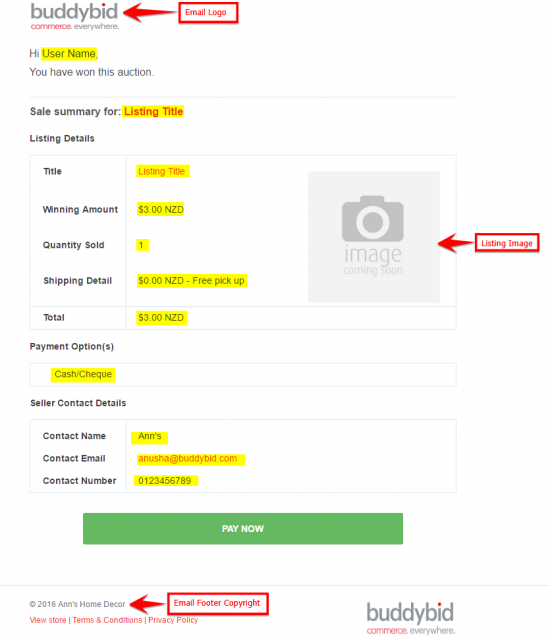
| + | | 1) Winner will receive email with subject – '''‘Congrats! You've won XXXXXX’''', Where XXXXXX refers to the listing title, also includes Winner Name,Winning Amount, Quantity bought,Shipping Details, Payment Options and Seller Contact Details. | ||
| + | |- | ||
| + | | 2) winner can pay through the email by clicking on '''PAY NOW''' button in email. | ||
| + | |} | ||
| + | {| | ||
| + | [[File:won auction.png|border|550px|550px|link=]] | ||
| + | |} | ||
| + | |||
| + | {| | ||
| + | |'''Seller Email -''' | ||
| + | |- | ||
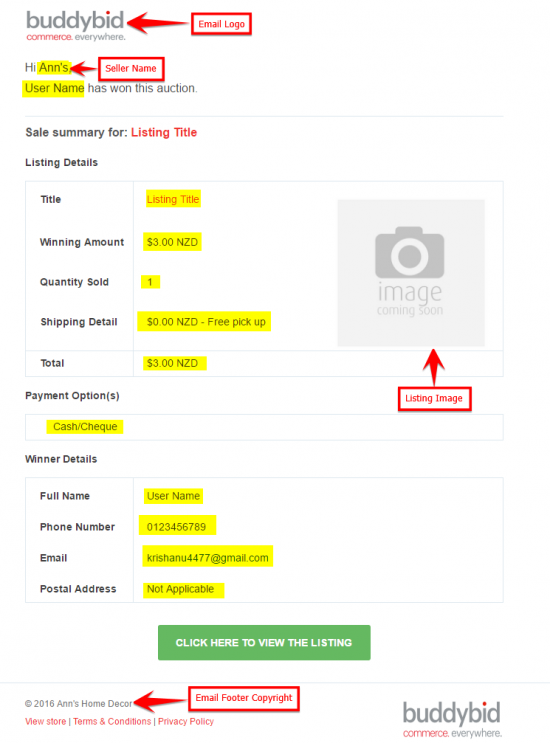
| + | | Seller will receive email with subject – '''‘Sold with a bid of $n.nn: XXXXXX’''',Where ‘$n.nn’ is the Auction sold at price and ‘XXXXXX’ refers to the listing title, along with other winner name, Quantity bought and buyer contact details, payment options, Shipping details. | ||
| + | |} | ||
| + | {| | ||
| + | [[File:seller won auction.png|border|550px|550px|link=]] | ||
|} | |} | ||
Latest revision as of 02:00, 31 March 2017
| Case# | Listing | Event | Email to Buyer | Email to Seller |
| 5 | Auction | Buyer won | Winning Bidders will receive email | Seller will receive email |
| Editing Option - |
| Owner can change Email Logo and Email Footer Copyright under STORE -> Store Settings -> Branding Details. |
| Buyer Email - |
| 1) Winner will receive email with subject – ‘Congrats! You've won XXXXXX’, Where XXXXXX refers to the listing title, also includes Winner Name,Winning Amount, Quantity bought,Shipping Details, Payment Options and Seller Contact Details. |
| 2) winner can pay through the email by clicking on PAY NOW button in email. |
| Seller Email - |
| Seller will receive email with subject – ‘Sold with a bid of $n.nn: XXXXXX’,Where ‘$n.nn’ is the Auction sold at price and ‘XXXXXX’ refers to the listing title, along with other winner name, Quantity bought and buyer contact details, payment options, Shipping details. |