Difference between revisions of "Blacklist"
From BuddyBid wiki
| (10 intermediate revisions by the same user not shown) | |||
| Line 7: | Line 7: | ||
{| | {| | ||
| − | [[File:blacklist button.png|border|550px]] | + | [[File:blacklist button.png|border|550px|550px|link=]] |
|} | |} | ||
| Line 15: | Line 15: | ||
{| | {| | ||
| − | [[File:blacklist popup.png|border|550px]] | + | [[File:blacklist popup.png|border|550px|550px|link=]] |
|} | |} | ||
{| | {| | ||
| -After clicking on 'Confirm blacklist button', it will redirect to the 'Manage Blacklisted Users' page. | | -After clicking on 'Confirm blacklist button', it will redirect to the 'Manage Blacklisted Users' page. | ||
| + | |- | ||
| + | | -If buyer place a bid on any listing on your storefront or try to buy 'Buy Now' listing will not be allowed to place a bid or buy and will see this message. | ||
|} | |} | ||
{| | {| | ||
| − | [[File:manage blacklist.png|border|800px]] | + | [[File:buyer popup1.png|border|550px|550px|link=]] |
| + | |} | ||
| + | |||
| + | |||
| + | == Remove Blacklisted User == | ||
| + | {| | ||
| + | | Go to STORE -> Manage Blacklist user | ||
| + | |} | ||
| + | |||
| + | {| | ||
| + | [[File:manage blacklist.png|border|800px|800px|link=]] | ||
| + | |} | ||
| + | |||
| + | {| | ||
| + | | Click on 'Remove' button, user will remove from the blacklist. User now allowed to place a bid and buy the listings from seller store. | ||
| + | |} | ||
| + | |||
| + | |||
| + | == Restrictions on Blacklisted User == | ||
| + | {| class="wikitable" style="text-align: center;" | ||
| + | | '''Action''' | ||
| + | | '''Allowed''' | ||
| + | |- | ||
| + | | Place bid | ||
| + | | N | ||
| + | |- | ||
| + | | Buy Now | ||
| + | | N | ||
| + | |- | ||
| + | |[[File:icons.png|100px]|100px|link=] | ||
| + | |Y | ||
| + | |- | ||
| + | | Ask a Question | ||
| + | | Y | ||
| + | |- | ||
| + | | Post Facebook Comments | ||
| + | |Y | ||
| + | |- | ||
| + | | Browse Listings | ||
| + | |Y | ||
|} | |} | ||
Latest revision as of 01:56, 31 March 2017
Business owner has rights to Blacklist a buyer when situation demands.
Blacklist User
| -Go to the respective listing where bidder needs to be blacklisted. |

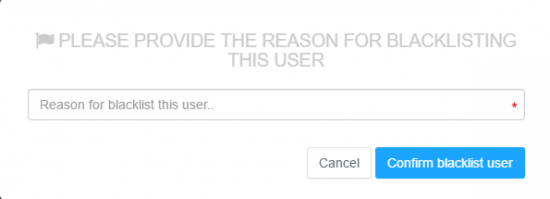
| -Blacklist the user by clicking on ‘Ø’ right side on the bidder name as shown above. After clicking on that pop-up window will open by asking reason, enter the reson and click on 'Confirm blacklist user' |
| -After clicking on 'Confirm blacklist button', it will redirect to the 'Manage Blacklisted Users' page. |
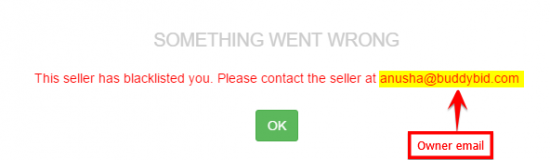
| -If buyer place a bid on any listing on your storefront or try to buy 'Buy Now' listing will not be allowed to place a bid or buy and will see this message. |
Remove Blacklisted User
| Go to STORE -> Manage Blacklist user |
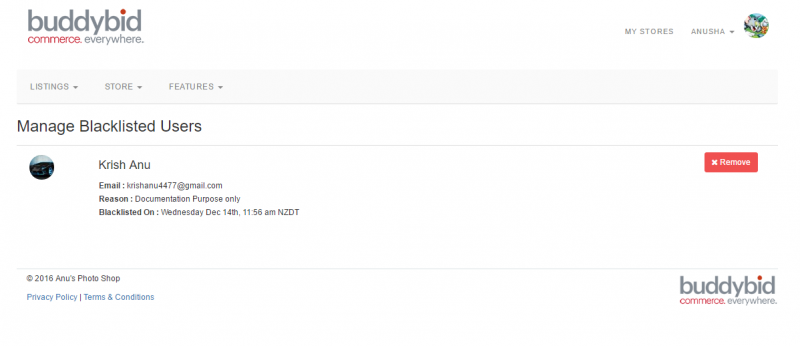
| Click on 'Remove' button, user will remove from the blacklist. User now allowed to place a bid and buy the listings from seller store. |
Restrictions on Blacklisted User
| Action | Allowed |
| Place bid | N |
| Buy Now | N |
| [[File:icons.png|100px]|100px|link=] | Y |
| Ask a Question | Y |
| Post Facebook Comments | Y |
| Browse Listings | Y |
